Thursday, May 25, 2017

Chrome Extensions

ColorZilla

ColorZilla is a plugin that grabs the color from a specific part of the page and returns a value for that color. It's very useful for designers, you can just take a color you like, and use it on your own work.

This plugin is very easy to use. You can just click on the icon, and a hexcode for the color will show up wherever you hover.

This extension is very easy to use. I didn't need any instruction, it was very easy to figure out. I would recommend this plugin to anyone who finds themselves working with colors.

Forest

Forest is an extension that's meant to help productivity. It provides a small incentive to keep the user from going to blacklisted sites which they might get distracted by. This extension is nice for someone who feels their productivity is falling behind.

To use it, you simply set an amount of time that you want to be productive, and it will plant a virtual tree. If you go to certain websites before the time is up, you're gonna kill the tree.

This extension is very easy to use. It doesn't completely restrict you from going to these sites, but it provides a slight incentive to stay away from distracting sites.

Grammarly

Grammarly is a plugin to help correct grammar mistakes as you type them. It's the perfect tool for anyone that's prone to having grammar problems.

This is a very easy to use plugin. It'll put its logo in the bottom-right hand corner of the text box, and display how many mistakes it finds. If you click on it, it'll give you the option to automatically correct the mistakes.

This plugin takes no time to set up. Just download it, and you're ready to go.

Final Reflection: Exploring Web

What I Learned

Technology

I came into this year with a pretty basic knowledge of what I was doing in web design. I ended up being one of the only people who could make a working website for our final project last year, so I figured I should give the class a shot and see if I liked it. I ended up learning a lot and making some works that I'm really proud of. One such example is my rollover site, that in my opinion looks really clean, and I enjoyed learning how to make it. We learned so much over the course of the year, and I can honestly say I took significant knowledge away from this class. I'm glad I got to extend the knowledge I previously had with the minimal amount of web design I learned last year and enjoyed doing it along the way.

Collaboration

There wasn't much collaboration throughout the course of the year. This has been a pretty solitary class, which I don't mind at all. It was my biggest struggle in video because I'm such a solitary worker. This class was a good fit for me in that way because I could work by myself and only take responsibility for my own work.

Communication

Despite there not being much collaboration, there was a significant amount of communication. Whether that was with my classmates or my teacher, I had to talk to people all the time. There were people in the class who knew a lot more than I did, and even though it hurt my pride a little, I asked for help when I needed it. (Thanks Ethan!!) I also had to communicate with Mr. Olson through email at times. Even though there wasn't as much communication as was needed in video, I still used it throughout the year, and mustered up the courage to ask for help when I didn't understand something, which has been a struggle for me in the past.

Project Management

I tried to do a lot of my work outside of class. This was probably pretty confusing for my teacher, but I have some good reasoning. I have a much better knowledge of the version of Dreamweaver that I have on my laptop, so working outside of class was much easier for me. There were probably days where it looked as if I was not doing much, but I always worked hard behind the scenes. I would often create content if that was required of me in class, and then would do the actual site building at home. That was just what worked for me. Transferring the files was a bit of a challenge at times, but I would always manage to figure it out. Overall I would say I had solid project management, even if I had a skewed process.

Leadership

Because there was not much collaboration to be had in this class, I can't say that I improved in a major way in the leadership category. I also wasn't one of those students who knew a ton about the class coming into it so I couldn't help out my classmates like some have done for me. In video, I would say my leadership skills got more of a chance to shine, but in here they weren't really applied. This wasn't a problem for me because I am more of a solitary worker than anything.

Strengths and Weaknesses

I don't know that I would say I have specific strengths in this class, but overall I would say I have enough technical ability to call that a strength. I get my work done and when I finish with it, I like the results. I think I produce work that is clean and is something I'm proud of. Even though I don't possess the skills that some of my classmates do, I think that I have good technical ability in general. I guess I could say that my project management was a weakness for me because I had such an awkward process: working some at home and some at school. If it seemed as though I wasn't working, I was doing a lot at home. Because of this weird process, sometimes my work did not get turned in on time because I had trouble relinking all the files and uploading it to the server, which is something I wish I could just do from my computer, but what I did worked. I can't speak for the other areas because there wasn't much application of them in this class as a whole, so I can't say that any of them were a real strength or weakness.

Application

The strand I am going into next year is journalism, so I most likely won't have much use for the skills that I learned this year in web design. There is a website for that class so I may have to use them to make edits or solve problems regarding that. In my personal life, however, I can see myself using the web design skill that I cultivated this year to make websites for my own personal use.

What Would I Change?

Overall, I wish that I had more knowledge of web design coming in, especially from my freshman year. I wish that it was stressed more heavily than the other strands because having a better grasp for it would have helped me a lot. I also wish that I did not have such a backwards process of creating websites because it would be better to get all my work done at school rather than save some for home.

Conclusion

I really enjoyed this class. Often I would look forward to it more than any other classes because it was just so fun. It was a great way to let my creativity flow in a productive way, and learn some skills that will help me in the future. Even though I am not going into the web design strand for my junior and senior years, I still will look back on my days in exploring web design fondly, becuase it really was just a fun class. Almost everyone that I talked to enjoyed it a lot, and so did I. Here's to a great year.

Tuesday, May 23, 2017

Final Reflection: Exploring Video

What I Learned

Technology

I joined this class somewhat late in the year, and because I did so, I never really got to learn with the other students how to use the cameras. Over the coarse of the year, I familiarized myself with the cameras and how to take good shots. I also learned how to improve my editing skills, and did so with numerous tutorials and just raw experience. Using Premiere is so fun for me, and even if the other students do not like it, I enjoy learning the many uses of the program. The technology aspect is important because it is how the overall video looks, and over time I have become obsessed with only making projects that I am 100% proud of. I strive to make videos that are the highest quality, and when I do not achieve that, I am really disappointed. My favorite project this year was the music video, which turned out as an amazing frame by frame recreation of All Star by Smash Mouth.

Collaboration

Collaboration has been my biggest challenge this whole year. I am a very solitary worker, and as everyone knows, video is a very collaborative class. Over the course of the year, this was an extreme challenge for me, especially during the entertainment section during second semester. I realized that I work better with some people than others, and I need to accept the differences that I have with them. Even if it is difficult to work with some people, I need to just get over it and deal with it, because it is only for a short time and is not a big deal. I also have realized through my continuation of the year that I do not deal well with difficult partners, because I am such a perfectionist with my work, and if I feel like they are not, it really bothers me. Overall, this year has showed me that I need to work around that weakness of mine and just get along with people, because multiple minds working towards the same goal is better than just one.

Communication

Communication has a lot to do with collaboration, but is not entirely the same. I communicate with others fairly well, be it outside of school or in class, in order to get work done. However, as I am more of a solitary worker, communication does not come as easily to me as the technical aspects of this class. Communication is vital to this class because of the heavy amounts of collaboration involved, and I feel like as the year progressed and I got closer with some of my classmates, my communication improved.

Project Management

Project management is so important in the class that I am going into next year: convergence journalism. I strived to improve my project management, as I struggle with procrastination a lot. I feel as though I am a very effective editor, and because of that my project management did improve a lot. However, because I am such a perfectionist, actually filming shot was very difficult because I wanted to make sure they were perfect. That is why some projects were done more efficiently, because I was confident in my ability and confident that it was a good video. I wish that I was as confident about every video, so that it did not hold me back, but I feel as though I am improving.

Leadership

I feel as though my role as a leader shined through in some projects, and others I was too timid to step up. Every group needs a leader, and even though I do feel as though I have very good leadership skills, I sometimes do not have the confidence to step up and say what I am thinking. My confidence in this area did improve over time, especially towards the end of second quarter, because I felt as though I had done very with journalism, where I think I am the best. That is where I stepped up the most, and helped out a ton with the final project and its production. That was the height of my leadership. As the year progressed though, and lead into entertainment, I felt my confidence in the area drop a bit, and I found myself going with what my group wanted to do rather than speak my mind. I feel as though next year, when I will be more confident with my abilities, I will be able to best demonstrate my leadership skills, particularly in the production of ONW Now.

Strengths and Weaknesses

I feel as though my abilities as an editor really got a chance to shine throughout the year. I learned how to better use Premiere, and I believe that I improved a lot. I know how to do so much in the program, and I am really proud of myself for that. I wish I could have primarily done the editing, as in I wish instead of focusing on filming, sometimes I could primarily focus on editing and post production. I know that was not the focus of this class, but it would have been a good fit for me. As far as weaknesses go, I had a lot of trouble with my self-confidence and perfectionism, even though I did my best to hide these problems. I wish that I could get over them, and I am working on it, but I hope to abandon that problem completely by the end of my senior year.

Application

I hope to apply the skills I have learned this year in my junior and senior year as I improve further in convergence journalism. I am going to focus more on improving my editing and my post production skills to better myself, and to be a good help while working on the set of ONW Now. I want to be primarily behind the scenes, and I feel as though the skills I have learned this year will adequately aid me in doing so. I want to be a big contributor to the production of ONW Now, and I feel like I can do so well.

What Would I Change?

Overall, I wish that I was not such a perfectionist when it came to filming. Also, ideally I would just  be doing convergence all year, but there is not much I can do about that. I wish that I was better at working with people, and that will be something that I have to work on heavily, in order to better myself and my work for next year.

Conclusion

I had a great time this year. From graphic design to video, I progressed as a content creator and found what I wanted to do. I improved my skills as an editor and film creator, and enjoyed doing so. I had my strengths, and my weaknesses, but overall I feel like I improved greatly. I got closer to some of my classmates, and learned skills that I will use for years to come. I hope to continue to work as I transition into journalism. 

Friday, April 21, 2017

Index Part 2, Electric Boogaloo

My Experience 

Overall, using the template to make a new website was very easy. You just substitute pictures and sentences fort he ones that are already given. The website looked very clean and concise, and the color scheme went very well with my profile picture, so I decided I would not change it. The way the final product looked was to my liking, and it made displaying works easy and appealing to the eye. Using it, however, meant that the final product was not entirely mine, and that was something I did not enjoy. It also was kind of rigid, and design view was practically unusable. It wasn't that hard to work around, and I enjoyed working with it in all honesty. I would hope that most pro web designers work from scratch, but I think that may not be the case. I guess it all comes down to preference and how unique you want your site to be, but I'd prefer to do it myself. 

Tuesday, April 4, 2017

Please Design Responsively

Overview and Importance

Responsive design is when the web designer uses media queries in order to make a website suitable for different screen sizes. No matter what size the screen is, the website should be able to work no matter what. This is important, because in this day in age, there are a variety of devices used to access the internet, with varying screen widths among said devices. The goal of a web designer is to organize information on a web page in a way that is easy for the viewer to digest. If the text on a page is too small to read on your phone, or too large to read on your laptop, it becomes harder to use the website. On my website, I used media queries to change the location of the navigation menu, from the side on larger screens, to being in the same column as the content on smaller screens. This will make it easier for visitors to my site to use the website.
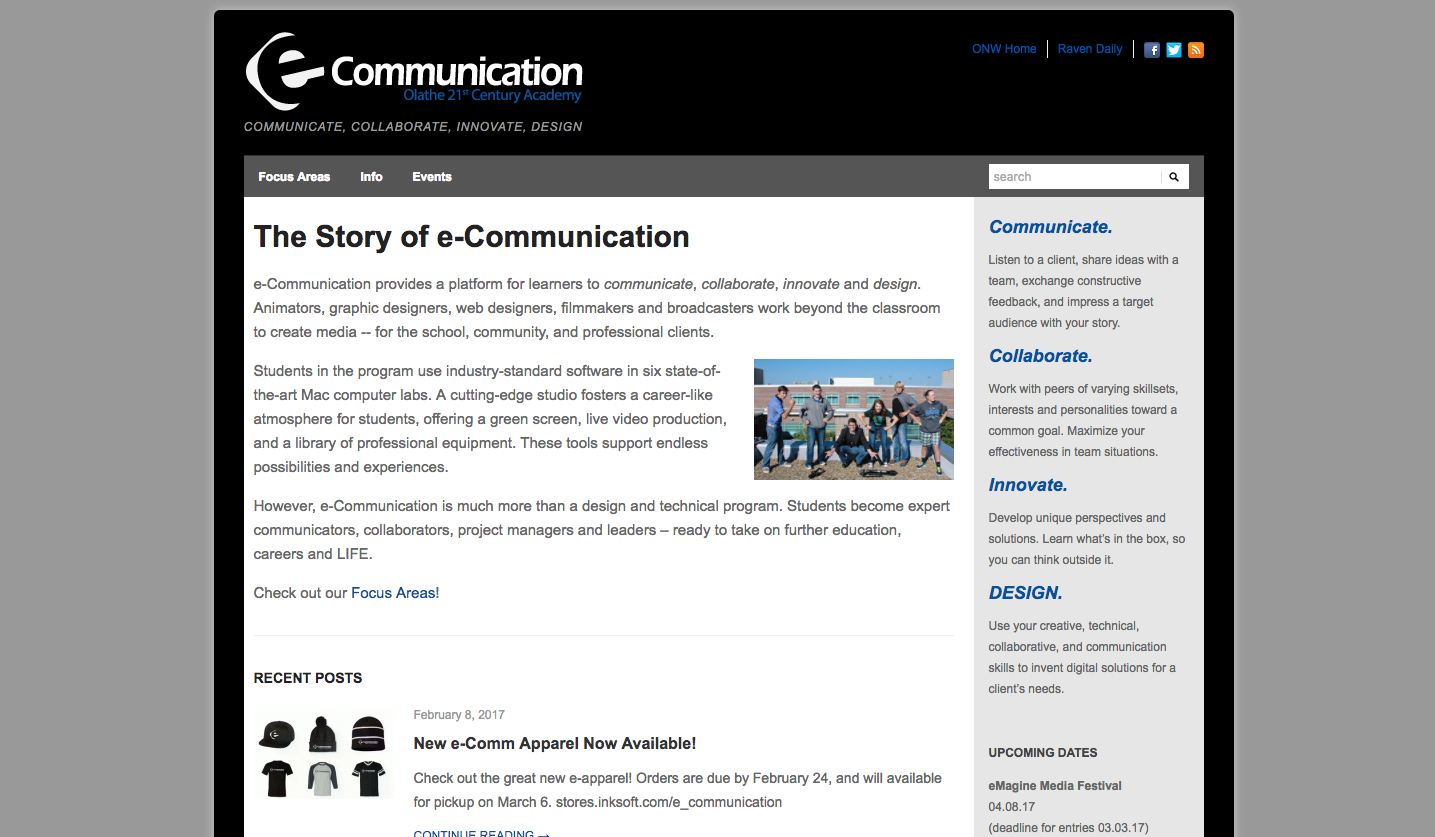
This is the desktop version of my site, as you can see, the sidebar is sitting comfortably to the right of the content.
With a smaller screen width, the sidebar moves out of the way of the content. Without this change, there wouldn't be enough room for both the content and sidebar to fit on the page.

Wednesday, March 8, 2017

Intro to Responsive Design

So What Is It?

In this day and age, we browse the internet across many different devices with varying screen widths. The amount of people viewing websites on mobile devices is increasing, so now it's important to account for both desktop and mobile users. Without the using responsive design, it can be hard to design a site that looks good across all devices. This is the goal of responsive design. Responsive design is when the website you're viewing adjusts to the screen size in order to look good across devices. The most efficient way to do this is by using media queries. Media queries are used to apply certain CSS styles only when the viewing width of the page fits within the parameters of the media query. In order to create a responsive design, you have to watch for breakpoints. You can find breakpoints by slowly decreasing the width of your window until the elements on the page become dysfunctional. This is where you insert a media query. You can make a website responsive by fixing these breakpoints.

My Example Site

Screen Shot 2017-03-08 at 10.09.35 AM.png
At full screen, the eComm site has a lot of information. This makes sense because there is a lot of room for this information.

Screen Shot 2017-03-08 at 10.09.50 AM.png
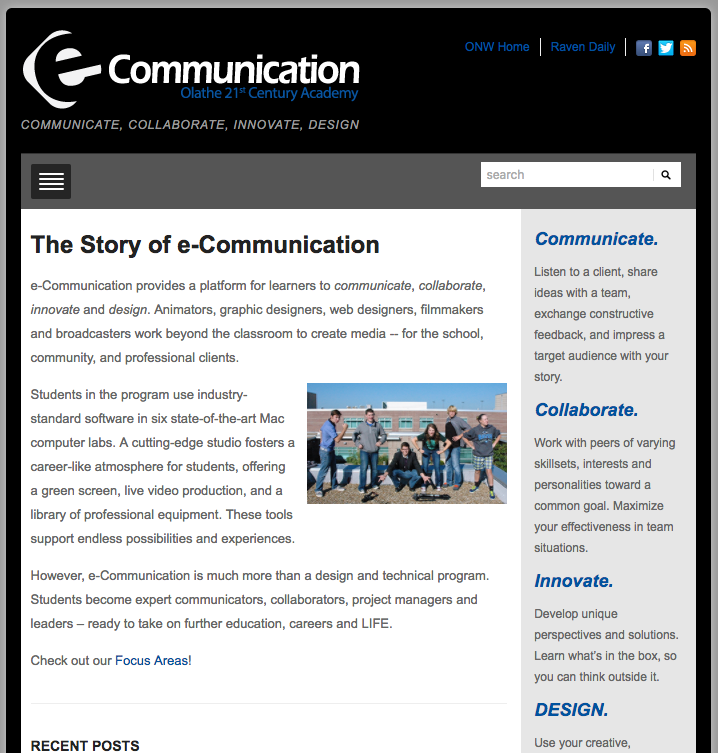
However, when the width is decreased, the navbar reduces to a hamburger menu to reduce clutter.
Screen Shot 2017-03-08 at 10.10.02 AM.png
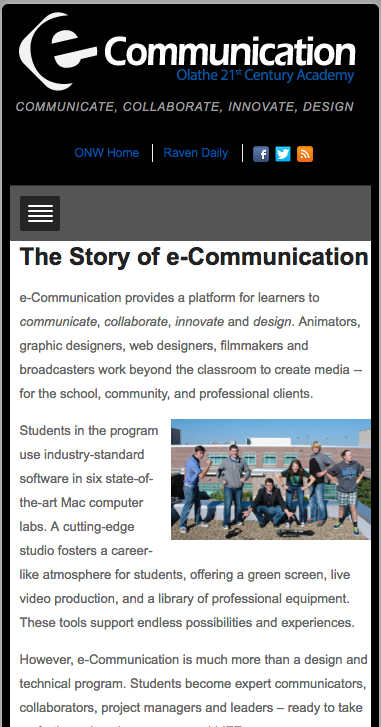
At the smallest width, the sidebar changes position in order to make room for the article.

Thursday, February 9, 2017

Quick as a Flash

What Is Flash?

Everyone knows Flash. You probably have, even if you don't know it. Flash games dominate school computers, where sites like Coolmath Games and Miniclip are widely used. As a general definition, Flash programs are interactive animations or videos that were widely used in the transitions stage of the web. It guaranteed universally identical content, not dependent on the user and their operating system.

Deterioration

Flash was still widely used when Stave Jobs announced in 2007 that the new iPhones would not support the plugin, marking the downfall of the program. This was in part due to users utilizing the program's ability to automatically run complex scripts on any website for malicious purposes. Among the other companies not supporting the program, Google has announced that Chrome 53 may be the last version that includes Flash standard, putting most companies at this point passed the Flash era. Flash's future is fairly bleak, because all media tends to deteriorate over time.

Still Important

Despite its rapid decline in recent years, Flash is still useful in many ways. In all, the program is the pioneer of video sharing services that most everyone is able to use, unlike the newer HTML5. The Flash Media Server is much more secure than sharing HTML5, keeping the content that is being shared on the creator's side, which in turn makes stealing their content much more difficult. Adobe acknowledged the decline of Flash in 2011, releasing Edge Animate, an HTML5 creator, that was mainly for mobile content sharing; most modern phones do not come with Flash Player installed automatically, and some do not have access to it at all. In doing so, they also stated during a press release: “This makes HTML5 the best solution for creating and deploying content in the browser across mobile platforms.” Among the sites that still run the program (mainly free gaming sites), Facebook reigns supreme, with games like Farmville and others that are still i use by many to the day.


Wednesday, November 2, 2016

It's Halloween!

Photoshop Aspects

To create this Halloween themed website, we first made design elements that would not be possible with Dreamweaver. These consisted of the gradient background, the animated header, and a little animated pumpkin. the animations were a nice little throwback to e9, because even though I'm not taking an animation class, I really enjoyed animation itself. The background was made using the gradient tool constrained to vertical use and made small so it could be perfectly repeating. The animated title was made using the font tool (and I found this awesome font on DaFont!) and the color tools. That's it. The beauty is in the simplicity. The pumpkin was a little more complicated, drawing some aspects from graphic design and animation to create a little animated image with the illusion that a candle is flickering inside it. Overall the graphic design and animation aspects were a fun change of pace in this class.

Dreamweaver Aspects

This project was the first time I had ever used an iFrame, but it's fairly useful. It is a good way to insert other websites without taking the user off of the current one. I linked multiple websites, including Halloween Safety, History, and some Scary Movies. This was the only real big difference in this project, but it was a fun challenge nonetheless. 

Friday, October 7, 2016

Raccoons and Berries and Postcards Oh My

Foreword

Recently, my class and I designed raccoons using Illustrator, a template, and our imagination. I typically use Photoshop if I want to do a personal project, so it was a nice change to use a different program. I found that I enjoyed Illustrator much more than I did last year, and with the skills I have learned recently I hope to use it more often at home.

Raccoon with Leaves and Berries

My first experience with the raccoon was with this introductory project, in which we were given a template to make the raccoon itself, and then freedom to do what we wanted with the background and accessories. Making it was not very difficult, with only simple shapes and colors to deal with. Originally, pathfinder was not working properly for me, and I wasn't able to remove some shapes from the final design, but I worked through it, and finished the raccoon. The background and accessories gave us more freedom, even though a template was still used for reference. I used the berry template to make berries, and then modified it to be leaves for the trees.

Postcard

The postcard gave us a lot more freedom to do what we wanted, with the only guideline being: use the raccoon in some way and scan in text. I enjoyed scanning in my own handwritten text, and because my handwriting is not the best, I used the light board and traced over a font I printed off. This was fun because it gave me my own handwritten flare and taught me how to remove the background in order to put it on the postcard. Making the card itself was nice because it gave me complete control over what I wanted to do with the project. All in all, I enjoyed this project and how much of it was up to me. 

Saturday, October 1, 2016

Raven vs. Crow

New Beginnings

This project was fun for me because it was the first bit of freedom we received. We were given just a bit of instruction and trusted to figure the rest out. I enjoyed working with the divs and editing the pictures. I wish that I had a bit more time to work on it, because it was kind of challenging, but I doubt it would have made much of a difference because this was a step into dreamweaver. I enjoyed working with Dreamweaver, because I have done work with it before, and I really like the new and improved CSS menus.

Tuesday, September 20, 2016

Hours d'Oeuvres

Out of the Blue:


For this project, we experimented with color values to make specific combinations of red, green, and blue. They are arranged with a six number (or letter) pattern that looks like this: #RRGGBB. Certain combinations make certain colors, with the higher the value equalling darker colors, an vice versa. They used a unique system that placed values on a range from 0-15, much like how we normally use the 0-9 values. Values 10-15 are represented by a-f respectively. So, for example, #000000 would turn out black, and #FFFFFF would turn out white.


Fontastic

Our goal with this project was to figure out what fonts could be viewed by virtually all computers, as well as be able to name and utatlize all of them. This is necessary because even if someone were to build a website around a font that another computer may not process, it will not look the same. These, however, can be view by all, and therefore are 'web safe.' There are two categories: serif and sans-serif. The serifs tend to look more formal, and include Times New Roman, Georgia, and Courier New. The sans-serif fonts have a more casual look (including one that is arguably TOO casual), and include Arial, Verdana, Tacoma, Trebuchet MS, and the ever popular Comic Sans MS.

Monday, September 12, 2016

Photoshop Reflection

What I Learned

In just this short amount of time my knowledge of Photoshop has increased tenfold. I have learned new ways to remove small details from images, or layer details on top of the original for a more complete look. The first few little projects were fairly simple, but as time went on they got progressively more difficult. The collage ended this little list of projects, and was a good test of skill as it incorporated the skills learned prior.

Key Tools

First off, we used the Content Aware Fill. It is rather situational, but can save the user from doing too much work if used correctly. The Patch Tool was next, and we learned how to remove a graphic from a t-shirt. This can be used in large areas that can be fixed with a similar space. Clone Stamp and Healing Brush was next, and even though I knew how to use them prior, this project helped me refine my skills, especially using the Clone Stamp. The Spot Healing Brush proved to be a very useful tool that could do what would take a user a lot of time very quickly, and has less room for error than the Content Aware Fill tool. I used all of these for the last project, the portrait collage, which was the final step in mastering these tools.

Reflection

The tool that I enjoyed using the most was the Spot Healing Brush, which did so much for me with so little effort. It could make the sky the correct shade of blue, remove a tree limb, or fix a fence post. My strength was using the tools in somewhat different ways but still getting the same result, only easier. My weakness was taking a lot of time to fix things that I thought were not perfect because of how much of a perfectionist I am, so it took me a bit more time than others because I wanted perfect results. I would spend even more time working on them to make them exactly perfect if I was to do something differently, but otherwise I was very satisfied with my work. I would same methods to achieve the same results. I really enjoyed doing this little group of projects and I am so satisfied with my results. I like Photoshop a lot and I am always looking for new ways to use it, because I have access to it at home, so I use it in my free time.

Photoshop Reflection

What I Learned

In just this short amount of time my knowledge of Photoshop has increased tenfold. I have learned new ways to remove small details from images, or layer details on top of the original for a more complete look. The first few little projects were fairly simple, but as time went on they got progressively more difficult. The collage ended this little list of projects, and was a good test of skill as it incorporated the skills learned prior.

Key Tools

First off, we used the Content Aware Fill. It is rather situational, but can save the user from doing too much work if used correctly. The Patch Tool was next, and we learned how to remove a graphic from a t-shirt. This can be used in large areas that can be fixed with a similar space. Clone Stamp and Healing Brush was next, and even though I knew how to use them prior, this project helped me refine my skills, especially using the Clone Stamp. The Spot Healing Brush proved to be a very useful tool that could do what would take a user a lot of time very quickly, and has less room for error than the Content Aware Fill tool. I used all of these for the last project, the portrait collage, which was the final step in mastering these tools.

Reflection

The tool that I enjoyed using the most was the Spot Healing Brush, which did so much for me with so little effort. It could make the sky the correct shade of blue, remove a tree limb, or fix a fence post. My strength was using the tools in somewhat different ways but still getting the same result, only easier. My weakness was taking a lot of time to fix things that I thought were not perfect because of how much of a perfectionist I am, so it took me a bit more time than others because I wanted perfect results. I would spend even more time working on them to make them exactly perfect if I was to do something differently, but otherwise I was very satisfied with my work. I would same methods to achieve the same results. I really enjoyed doing this little group of projects and I am so satisfied with my results. I like Photoshop a lot and I am always looking for new ways to use it, because I have access to it at home, so I use it in my free time.

Monday, August 29, 2016

Let's Go Way Back

Popular Sites: Past and Now

eBay

Before
After
The difference between both the old eBay and the new eBay is striking. There were a lot more links and a lot less pictures. New eBay looks a lot more uniform and doesn't have such a crazy color scheme. The old eBay is super cluttered and in my opinion looks... Not the best. I kind of like the crazy logo better though.


YouTube

Before
After
Another theme I'm noticing with the older websites is that they're not as wide as newer ones. Is this because of the difference in monitor size, or another reason? As well as with eBay, older Youtube looks way more cluttered, and has all its tabs on the top instead of on the sides. The logo isn't much different, but the layout is. There are also some contests, and YouTube doesn't really host any more now.


Before
Twenty One Pilots

I chose the Twenty One Pilots website as my last one because it was cool to see the progression of their website as the year went by and they got more popular. I enjoyed them before the Blurryface album (which was the one that made them famous) and it was pretty different before then. I like the older website better actually, cause I liked their red and blue color scheme and favor it over their red and black one.

After


Codes: Then and Now

eBay

Before

For eBay, the main thing that stands out is the code that spells out eBay in the newer website, which is a cool easter egg from the designers. There was a lot of code for the old eBay, which is understandable because there were many different aspects to the old website. The new one looks much cleaner and is shown in the code.


After


YouTube

Before
YouTube's code is drastically different to what it was. In the current version of YouTube, there is so much code the browser lagged trying to pull it up. That's understandable, because videos and formatting them takes up a lot of space. In the old version, there wasn't so much on the home screen so it was maybe a fourth of the length it is now. 

After


Before


Twenty One Pilots 

On this website, there wasn't much difference with the code. There are more pictures and the code reflects that, but there isn't a drastic difference like with YouTube or eBay. It's still interesting to look at them side by side, though. The length is also very similar, unlike YouTube.
After

Friday, May 13, 2016

How the GYRs Turned

My group was named GYR, and our product was the GYR breathalyzer. The team was very technically capable, and got all of our work done on time. Most of us got along very well, but one person really prevented us from clicking as well as we could have if they were not there. That one person held back our team at times by saying that they didn't like any other ideas we presented, but not giving any alternatives. With the next group project, I won't take on so much work, because it really gave me that 'everything has to be totally perfect' mentality that I really dislike having. I think that all of our work was really solid, but I'd maybe work for a bit longer on our presentation. Technical difficulties are great, aren't they? I worked on the final animation, made the whole website, and made the ad. All in all, I really liked this project, and I would do one similar to it in a heartbeat.

Thursday, December 17, 2015

The Winchester


For this project, we put our Sketchup knowledge to the test. We followed a blueprint to make a house of the exact size and almost exact placement of windows and doors. I also added vegetation and a driveway to make change it up a bit. Making the roof was the most fun and kind of challenging, but I also really liked making the windows. We also made an animation, which is showcased in the video. Sketchup did most of the work, we just had to set key frames and the rest of the work was done for us. It was great changing the colors and adding little changes to make this house my own; that was definitely my favorite part. All in all, I loved this final project.

Webpage

For a taste of web design, our class made a webpage in Adobe Dreamweaver. We had to insert our elevator pitch, bio, and a few of our favorite projects. I chose my sketch animation as my favorite because it was a challenge but was still really fun. I also like the butterfly project because it was unique and fun. We added hyperlinks, changed the font and headers, and changed the look. The borders and the background also got a face lift, in an attempt to make it look semi-unique. I hope to make even more complex and unique websites in the future!

Wednesday, December 2, 2015

In the Doghouse

With this SketchUp project. we used a base, like a blueprint for a building. We used exact measurements to make the doghouses identical, save for the colors and the little accessories that I added in, namely the dog and the bowl. I likes having the freedom to do whatever I wanted with the last project, but I really like SketchUp, so it was still fun.

Bord och Stol

For a while now, we've been using the program SketchUp to create 3D models of things. For this project, we created a table and chairs, and I modeled mind off of a table at a restaurant or bar stools. I used the Follow Me tool to make the corners not so sharp. and made the chairs all components and rotated them so that they would all be exactly the same. This was a really fun project!

Friday, November 20, 2015

Sketchy

For this project, we had to rase our names backwards to create the illusion of someone drawing our names. I chose a relatively hard font to work with, to make it look like it was a bubble letter drawing with artsy details inside. Hannah and I did a kind of joint project concerning this, and I love the finished product!